
Best Practices for Your Texting Script
Crafting an effective initial message is one of the most important steps in a successful texting campaign. A well-written first message improves the chances your text is delivered and encourages real responses from your contacts. This guide outlines how to write compliant and effective SMS and MMS messages that avoid carrier filtering and help you start conversations with confidence.
TABLE OF CONTENTS
- Interactive Checklist
- Importance of Required Variables
- General Messaging Tips
- Formatting Tips
- Message Testing
Interactive Checklist
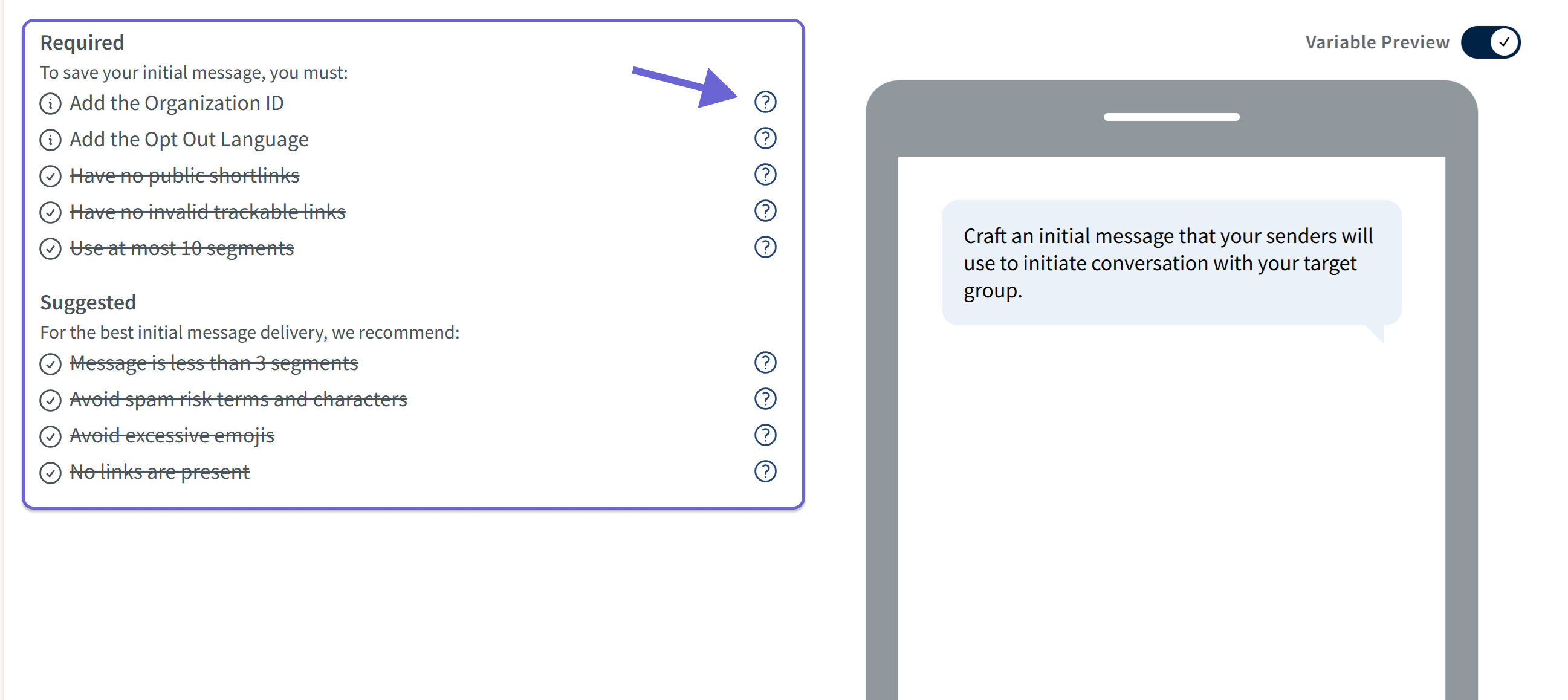
The message editor includes a built-in checklist that updates as you write. It checks your message for compliance and best practices in real time.
- Required items must be completed before you can save your message. Violations will appear in red.
- Suggested items are optional but improve the likelihood that your message will be delivered.
- Highlight the tooltip to review details on each required and suggested item.
Importance of Required Variables
Organization Display Name
Including your organization’s name in the initial message improves deliverability by helping carriers verify who the message is from. During Step 1 of Campaign Creation, you’ll enter your Organization Display Name in a text field. This text becomes available as a required variable Org Name for your script later in the campaign setup. Tailoring this name for different audiences can help create a more relevant experience; for example, students versus parents.
Opt Out Language
Carriers require opt-out instructions in every initial message to ensure recipients know how to stop receiving texts. To make this easy, GetThru provides a drop-down menu of pre-approved, compliant phrases curing campaign creation, and the selected phrase appears as the Opt Out variable added to your initial message. If your account has Auto Opt Out enabled, any reply matching an opt-out phrase will automatically remove the contact. Bypassing opt-out language can lead to account suspension, so always include it. A simple, polite phrase like “you can text stop=quit” keeps your message user-friendly while meeting compliance requirements.
Keep in mind that required variables count toward messaging character limits. See our guide, Text Message Segments and Encoding, for more information.
General Messaging Tips
Avoid Including Links in Initial Messages
Including a link in your first message increases the risk it will be flagged as spam by carriers. Instead, wait until a contact replies before sharing a link. For example, your initial message could invite a volunteer to an event. If they respond that they are interested, you can include a link to an RSVP form in the following message.
If you must include a link:
- Use a secure, branded link that begins with "https://" and your domain name, if possible.
- Consider using a branded, trackable links generated from our system. These links allow you to track each link click. You can read more in our Link Tracking guide.
- Avoid third-party shorteners like bit.ly, goo.gl, tinyurl, etc., which are commonly flagged by carriers. Review below for examples of link shorteners it is best to avoid:goo.glrb.gybit.lyshorturltinyurl.comtiny.ccsoo.gdic.chatis.gdBc.vcs2r.coclicky.mebudurl.comrebrandly
Keep Messages Short
Concise messages are more likely to be delivered and have a higher likelihood of interaction from contacts. Although SMS messages can be up to 9 segments, we recommend limiting your initial message to 1–3 segments.
However, if your message is long, consider using MMS instead. MMS messages:
- Support up to 1,600 characters (though under 1,000 is recommended)
- Count as 1 message segment regardless of length
- May help reduce delivery issues from long SMS segment messages
If using MMS, we recommend including a clear and concise call-to-action in the attached media. For more information about MMS review our guide: What is MMS in ThruText?
Invite Contacts to Engage
End your message with a simple question to encourage replies. This helps build rapport and improves deliverability by signaling to carriers that you're having a real conversation.
- Example: Are you interested in learning more?
Avoid Prohibited Words
Carrier-prohibited terms can trigger carrier-level filtering, leading to your messages getting blocked, and potentially the deprovisioning of a sending phone number.
Common words and phrases that trigger carrier filtering include the following:
- Gambling references, which can include lotteries. For example, a message about entering a lottery may be interpreted as gambling and blocked under carrier restrictions, even when sent by nonprofits.
- Monetary terms (e.g., dollar, gift, $)
- SHAFT terms: sex, hate, alcohol, firearms, tobacco
- Cannabis-related content, including marijuana, CBD, Kratom, and drug paraphernalia
- Messages using these terms may be blocked, independent of the laws in your state. Contact support@getthru.io for messaging tips if you need to send texts related to cannabis/marijuana.
- Messages using these terms may be blocked, independent of the laws in your state. Contact support@getthru.io for messaging tips if you need to send texts related to cannabis/marijuana.
Avoid Letter Substitution
Replacing letters with symbols (e.g., "fr33" instead of "free") may trigger spam filters. Always use standard spelling to reduce the risk of filtering.
Use Emojis Sparingly
Adding emojis changes the encoding of your message, reducing each segment from 160 to 70 characters. Excessive emoji use can:
- Increase message cost
- Trigger filtering
- Make messages harder to read
Messaging Style
Avoid sending text messages in all caps or overusing capital letters (such as capitalizing every word), as this can trigger SPAM filtering. Additionally, avoid sending large volumes of non-personalized messages. Using natural formatting and personalizing your outreach whenever possible helps improve engagement and reduces the likelihood of carrier filtering.
Formatting Tips
SMS Tips
Avoid copying and pasting from other programs. Typing directly into the message editor helps preserve formatting and encoding. Pasting from Word or other programs can:
- Introduce formatting issues
- Increase segment count
- Lead to unexpected costs
Please check out our Text Message Segments and Encoding guide for more details on how encoding impacts message segment length.
MMS Tips
Large files may take an extended period or not deliver. Use smaller media files when possible. Images, GIFs, PDFs, and videos have a max upload size of 10MB and the final, largest size after compression in 750KBs.
Note for U.S. accounts: You must register a sample image before adding media to a campaign. Please review our guide MMS Approval - Adding Sample Media to a Use Case for those details.
If your file exceeds the maximum upload size, please review our Preparing Media Files for MMS for tips on resizing your media.
Message Testing
Send Yourself a Test Message
Before launching your campaign, create a test group that includes your own number. Send yourself a message to:
- Preview how it looks on a mobile device
- Identify any delivery or formatting issues in advance
- For MMS, check image/audio quality
Remember, you pay for the messages you send, not just the ones that are delivered. It is in your business' best interest to optimize the delivery rate. If you have any questions related to delivery, please reach out to support@getthru.io.